
If your home internet still feels like it’s running on dial-up whenever more than three devices are connected, you’re not alone. In 2026, most households face a problem: an ancient ISP-provided router choking under the weight of smartphones, smart TVs, laptops, Zoom calls, PUBG sessions, and YouTube in the background.
TP-Link Archer AX21
Enter the TP-Link Archer AX21, a WiFi 6 router that consistently sells for around ~$50–60 on international listings. For that price, you’re getting technology most people associate with routers costing twice as much. I’ve been using one home with concrete walls, four adults, two kids, six phones, two laptops, a 4K Android box, and a Ring camera.
Table of Contents
Here’s the honest, no-fluff breakdown by hstech of why this little black box is currently the best value upgrade you can make in 2026.
Why WiFi 6 Actually Matters in Real Life
Most people hear “WiFi 6” and think “faster speed.” That’s only half the story.
The real game-changer is how WiFi 6 handles congestion, exactly the scenario you face every evening when everyone comes home.
1. OFDMA – The Multi-Passenger Magic Bus
Older WiFi 5 routers are like a single-lane autorickshaw: one device gets served, everyone else waits. OFDMA (Orthogonal Frequency Division Multiple Access) turns the rickshaw into a coaster bus that can drop off packages to 8–9 devices simultaneously in the same transmission slot.
Real-world result in my house:
- Before AX21, 4K YouTube videos started buffering the moment someone opened Instagram Reels.
- After AX21: Everyone streams, scrolls, and games at once with almost zero complaints.
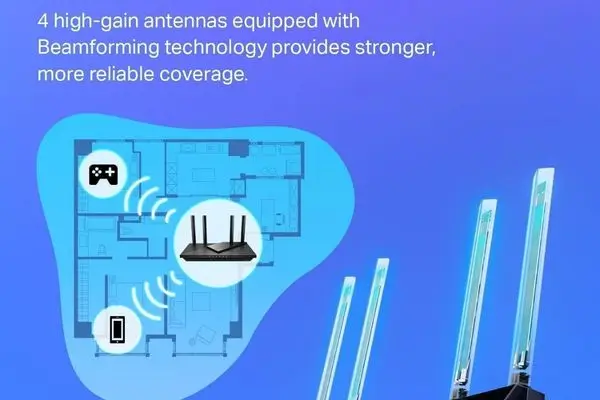
2. Beamforming – Laser-Focused Signal Instead of Shotgun Blast
Traditional routers broadcast the signal equally in all directions, like a garden hose watering plants. Beamforming detects your phone or laptop’s location and steers most of the signal toward it.
In practice:
- The 5 GHz band now reliably reaches the master bedroom (two concrete walls away).
- Upload speed on the far-end Zoom call jumped from 2–3 Mbps → 12–15 Mbps.
3. Target Wake Time (TWT) – Battery Saver for Smartphones & IoT
This feature tells devices, “go to sleep until I have data for you.” Battery drain on phones and tablets drops noticeably when they’re idle but still connected. Small win, but adds up.
Coverage Reality Check
TP-Link officially says “covers a 3-bedroom house.” That usually translates to:
- Good apartments / small independent houses (up to 10–12 marla): full coverage on both bands.
- Larger 1–2 kanal houses or multi-storey with thick RCC walls: 5 GHz drops significantly beyond 15–18 meters or through two concrete walls. 2.4 GHz still covers the whole house, but it’s slower.
The killer feature here is EasyMesh compatibility. If you need more range later, buy another cheap TP-Link OneMesh or EasyMesh router (Archer C6, RE505X, etc.), and it becomes a seamless mesh network, no separate SSIDs, no hand-off issues.
Security That Actually Matters in 2026
There has been a sharp rise in home network attacks (IoT botnets, credential stuffing, etc.). The AX21 includes three meaningful protections most budget routers skip:
- WPA3-Personal encryption – far harder to brute-force than WPA2.
- HomeShield Basic (free tier) – blocks malicious sites, intrusion attempts, and infected device quarantining.
- Built-in OpenVPN & PPTP Server – rare at this price. Set up your own VPN server at home, connect from any café or office in Pakistan, and all traffic routes securely through your home connection.
Pro tip: Use the built-in VPN server + Dynamic DNS (free services like No-IP) to access your home network from anywhere. Great for checking Ring cameras or grabbing files from a NAS when you’re out.
Setup – Even Your Mom Can Do It
Download the TP-Link Tether app (Android/iOS), scan the QR code on the router, choose your ISP connection type (PPPoE for PTCL, DHCP for Nayatel/Signal, etc.), set WiFi name/password, and you’re done in 4–5 minutes. The app also lets you:
- See every connected device
- Pause the internet for kids’ phones
- Create a guest network with a separate password
- Run speed tests
- Enable/disable Alexa voice control (“Alexa, turn on guest WiFi”)
Pros & Cons – The Raw Truth
What We Genuinely Love
- Insane price-to-performance ratio
- Noticeably better multi-device stability than any WiFi 5 router
- EasyMesh future-proofing
- Built-in VPN server
- Tether app is clean and reliable
- Four external antennas + good heatsink = stable, even during long gaming sessions
What Could Be Better
- USB port is 2.0 only → slow for NAS or media sharing
- 5 GHz range is still limited by concrete walls (normal for the price, mesh solves it)
- No MU-MIMO on the 2.4 GHz band (only 5 GHz)
- HomeShield Pro features require a paid subscription (but Basic is free and good enough)
Verdict – Who Should Buy the Archer AX21 in 2026?
Buy it if you:
- Still use an ISP-provided WiFi 5 router (especially PTCL ZTE/Modem + older D-Link/TP-Link)
- Have 8–25 devices at home (phones + tablets + smart TVs + cameras + consoles)
- Want future-proof WiFi 6 without spending
- Live in an apartment, small house, or medium bungalow
- Value VPN server and better security
Skip it if you:
- Already own a WiFi 6E or WiFi 7 router
- Need 2.5 Gbps WAN/LAN ports (AX21 is 1 Gbps)
- Live in a very large house with many dead zones, and don’t want to add mesh nodes
One-line summary for your WhatsApp group: The TP-Link Archer AX21 is still the undisputed “value king” of WiFi 6 routers in 2026, stable, secure, future-proof, and priced like it’s 2020.
Let me know if you want a side-by-side comparison table with the Archer AX23, RE705X mesh extender, or even the Mercusys MR70X (another strong budget contender). Happy to expand!