
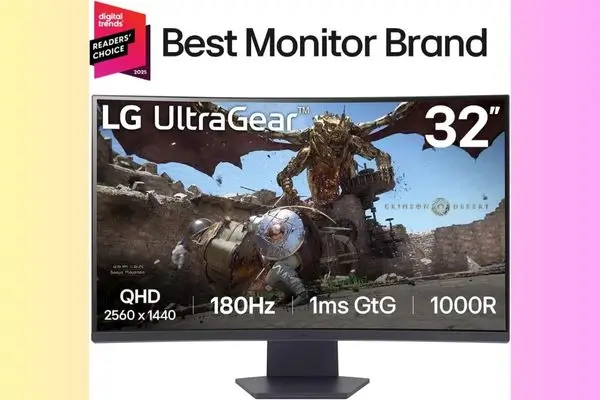
The LG UltraGear 32GS60QC-B is built specifically for the sweet spot of modern gaming: 1440p resolution (QHD) combined with high speed (180Hz). It aggressively tackles immersion through its dramatic 1000R curve and delivers rich visuals thanks to its VA panel technology.
Table of Contents
It stands out as an excellent, budget-conscious choice for gamers who prioritize a massive, enveloping visual experience. (hstech)
Quick Spec Summary (The Essentials)
| Specification | Detail | Practical Impact |
| Screen Size & Resolution | 32-inch QHD ($2560 \times 1440$) | Large canvas with a good balance of detail and performance. |
| Refresh Rate & Response | 180Hz & 1ms GtG | Fluid motion, competitive speed. |
| Panel Type | VA (Matte Finish) | Deep contrast and better blacks than IPS. |
| Curvature | 1000R | Highly aggressive curve for maximum immersion. |
| Contrast Ratio | $3000:1$ (Typical) | Excellent shadow detail and depth. |
| Adaptive Sync | AMD FreeSync (and VESA Adaptive-Sync) | Eliminates screen tearing and stuttering. |
| Connectivity | 2x HDMI (v2.0), 1x DisplayPort | Good versatility, but HDMI is limited. |
Expert Analysis: LG UltraGear
1. The Power of the VA Panel and Contrast
The $3000:1$ static contrast ratio is the monitor’s hidden strength. This VA panel excels in dim, atmospheric games (like horror or exploration RPGs). While IPS panels have better viewing angles, the reality is that a monitor with a $1000\text{R}$ curve is meant to be viewed straight on.
- Real-World Benefit: Scenes that are muddy gray on a lower-contrast monitor appear with genuinely deep, inky blacks here, revealing detail without overusing the Black Stabilizer.
2. The 1000R Curve Experience
The $1000\text{R}$ curve is the tightest available, matching the natural curvature of the human eye. This eliminates the distortion often associated with flat screens of this size and significantly enhances the sense of speed and scale.
- Target Use Case: It’s absolutely transformational for first-person cockpits (racing, flight sims) and makes the monitor feel smaller and more manageable than a flat 32-inch screen. If you’ve never used a tight curve before, be aware that it can take a few hours to adjust, but the feeling of being “in the game” is worth it.
3. Competitive Speed and Responsiveness
The combination of $180\text{Hz}$ and $1\text{ms GtG}$ ensures you have the necessary responsiveness for competitive games like shooters (FPS) and MOBAs. Crucially, Adaptive Sync compatibility works seamlessly with both AMD and NVIDIA GPUs (via VESA Adaptive Sync), guaranteeing smooth performance across the board with minimal motion blur.
Flaws and Practical Considerations
Every monitor makes compromises to reach a price point, and the LG 32GS60QC-B is no exception. These are the main “gotchas” buyers should be aware of:
| Flaw / Consideration | Detail and Impact |
| VA Panel Smearing | VA panels, while great for contrast, are susceptible to “black smear” or “ghosting” in transitions from deep black to gray. While the $1\text{ms}$ GtG speed is impressive, some users may notice motion artifacts in fast, high-contrast dark scenes. |
| Limited Ergonomics | The stand is tilt-only. It lacks height, swivel, and pivot adjustment. For a monitor this large, getting the screen to eye-level is crucial for comfort. Users will likely need to budget for a separate VESA mounting arm ($100 \times 100 \text{mm}$) to achieve proper ergonomic setup. |
| HDMI 2.0 Limitation | The two HDMI ports are only version 2.0. This means the full $180\text{Hz}$ refresh rate is only accessible via the DisplayPort input on a PC. Current-gen consoles (PS5/Xbox Series X) that require HDMI will be limited to $120\text{Hz}$ at $1440\text{p}$, missing out on the monitor’s top speed. |
| Basic HDR Performance | Supporting HDR10 is technically accurate, but with a typical brightness of 300 nits, the display lacks the necessary peak luminance for impactful, true HDR effects. Use of HDR will be subtle; this monitor is best enjoyed in SDR mode. |
| Pixel Density (PPI) | At 32 inches, the $1440\text{p}$ resolution results in a lower pixel density ($\sim 94 \text{ PPI}$). Text and fine details will be less sharp than on a 27-inch $1440\text{p}$ screen ($\sim 109 \text{ PPI}$). This is generally acceptable for gaming but may be noticeable during detailed productivity tasks. |
Final Conclusion and Value Score
The LG 32GS60QC-B UltraGear is a high-value, high-impact monitor. It is a smart, strategic purchase for the dedicated gamer, provided they understand its limitations. The speed, contrast, and immersion offered by the aggressive 1000R curve make it one of the most exciting $32$-inch $1440\text{p}$ options available near the two-hundred-dollar price point.
| Criteria | Score | Summary |
| Overall Value (Sale Price) | 5/5 | Unmatched features for the price. |
| Gaming Performance | 4.5/5 | Exceptional speed, smooth FreeSync, minor VA smearing. |
| Immersion | 5/5 | The 1000R curve on a 32-inch screen is a game-changer. |
| Ergonomics & Design | 2/5 | Stand is a letdown; expect to buy a VESA mount. |
| Target Audience | Competitive & Immersive Gamers on a Budget. |
Frequently Asked Questions (FAQ)
Q: What is the optimal viewing distance for the 1000R curve on a 32-inch screen?
A: The $1000\text{R}$ curve means the curve’s radius is 1000 millimeters (or 1 meter). This is generally considered the optimal viewing distance for maximum immersion. If you sit about 3 to 3.5 feet (0.9 to 1.05 meters) away from the screen, the curvature will perfectly match your natural field of view, minimizing visual distortion and eye strain.
Q: Will the curve be too aggressive or feel unnatural for non-gaming work?
A: The $1000\text{R}$ is indeed very aggressive. While it is superb for gaming, it may take a day or two to adjust to for standard desktop productivity or browsing. Users who work heavily with straight lines (like graphic design or CAD) may initially notice the curvature, but for general office work, the immersion quickly becomes a comfortable norm.
Q: Is the 1ms (GtG) response time reliable, or will I see ghosting?
A: LG achieves the $1\text{ms}$ (GtG) by using a high level of overdrive (“Faster” mode). In reality, using the monitor at this extreme setting can introduce “overshoot” or “inverse ghosting” (bright trails behind moving objects). It is generally recommended to set the monitor’s overdrive (Response Time) to the “Fast” or “Normal” setting to minimize ghosting artifacts, especially in dark scenes, which are a known characteristic of VA panels.
Q: How good is the HDR performance with only 300 nits of brightness?
A: The monitor’s HDR10 support is considered basic or “entry-level.” With a typical brightness of 300 nits, the display lacks the brightness to truly showcase deep, impactful highlights. While it can process HDR content and benefit from the VA panel’s high contrast, the HDR feature should not be the primary reason for purchasing this monitor.
Q: Does this monitor have built-in speakers?
A: No, this model does not include built-in speakers. You will need to use the $3.5\text{mm}$ headphone jack for external speakers or headphones, or rely on speakers built into your PC or console setup.
Q: I’m experiencing an “auto-brightness” issue where the screen dims in dark scenes. How do I fix this?
A: This is a common reported issue, often tied to a setting called “Smart Energy Saving”. To solve this:
- Go into the monitor’s OSD (On-Screen Display) Menu.
- Navigate to the General settings.
- Ensure “Smart Energy Saving” is turned OFF.
- If the issue persists, try changing the “Game Mode” and then checking the “Smart Energy Saving” setting again, as it can sometimes be grayed out until the Game Mode is changed.