
In the quest for a truly unified smart home, one problem always surfaces: what do you do with those reliable, decades-old infrared (smart IR) devices like your TV, air conditioner, or fan that predate WiFi and voice control?
Table of Contents
The MOES WiFi Smart IR Remote Controller is the answer. It’s a deceptively simple device that acts as a bridge, transforming dozens of your old, separate infrared remotes into a single, unified control system managed by your smartphone and voice assistant. At its budget-friendly price point, it promises to clear up your coffee table clutter and bring accurate voice control to every corner of your home.
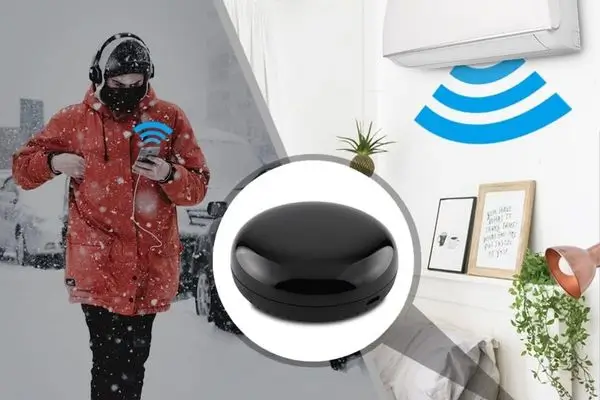
MOES WiFi Smart IR Remote Controller
Affordable, Effective, and a Smart-Home Essential
The MOES Smart IR Remote excels at its primary function: consolidating control over legacy infrared devices. It offers robust integration with the Smart Life/Tuya App ecosystem and seamless Alexa/Google Assistant voice control for pre-set functions. While it has limitations (like needing line-of-sight), for anyone looking to modernize their AC unit or TV without replacing the hardware, this is an indispensable, cost-effective solution.
Key Features and Functionality Breakdown
1. Universal IR Control
The core function of the MOES controller is to replace all your standard IR remotes. It supports an extensive library of over 50,000 IR-controlled devices and operates across a wide 360° omnidirectional range (up to 10-12 meters) within a single room.
- Real-World Use: With one tap in the Smart Life app, you can turn on the TV, turn up the AC, and power off the fan, regardless of the brand.
2. Hands-Free Voice Integration
This is where the MOES truly adds value. By linking the device through the Tuya/Smart Life app to Amazon Alexa orGoogle Assistant, you can now use voice commands for your previously “dumb” appliances.
- Example Command: “Alexa, set the living room A/C to 23 degrees Celsius.”
- Remote Access: Because it’s WiFi-enabled, you can control your devices remotely, turn on the AC on your way home so the house is cool when you arrive.
3. The DIY Learning Function
The biggest headache with universal remotes is compatibility. The MOES solves this with a programmable DIY copy function. If your specific TV or fan brand isn’t in their database, you can use the original remote to teach the MOES device the command codes via the mobile app.
- Crucial Note: It’s essential to understand that devices added using the DIY function can usually only be controlled via the Smart Life App and not by Alexa or Google Home.
4. Setup and Connectivity
The remote is compact and powered by a standard Micro USB cable (DC 5V/1A). It requires a 2.4GHz WiFi network connection (which is standard for most budget smart home gear). Setup is typically done through the popular Tuya or Smart Life app, offering a quick and straightforward pairing process.
Who Should Buy the MOES Smart-IR Remote?
This device is a must-have for two types of users:
- The Budget Smart Home Starter: If you want to dip your toe into home automation and voice control without spending hundreds of dollars replacing functioning appliances.
- The AC/Climate Controller: This is arguably the most valuable application. It allows you to automate your air conditioner, setting schedules, scenes, and controlling the temperature from your phone, which is impossible with the original remote.
The MOES WiFi Smart IR Remote Controller offers an elegant, affordable solution to a widespread problem in smart homes. It effectively modernizes your older appliances, providing a level of convenience and control that feels genuinely advanced. (hstech)
Technology Solutions Professional: Guide + 5 Key Responsibilities