
Whether you’re a competitive esports player, casual console gamer, or PC enthusiast, your gaming desk is the foundation of your entire setup. The right desk doesn’t just hold your equipment; it enhances your performance, protects your health, and elevates your gaming experience. This comprehensive guide will help you navigate the world of gaming desks, from budget-friendly options to premium setups designed for serious gamers.
Table of Contents
Table of Contents
Why Your Gaming Desk Matters More Than You Think
A quality gaming desk impacts three critical areas of your gaming life. First, it directly affects your ergonomics and posture during those marathon gaming sessions. Poor desk height or inadequate space leads to neck strain, shoulder pain, and wrist discomfort that can sideline you from gaming altogether. Second, your desk determines how much equipment you can comfortably accommodate; multiple monitors, gaming peripherals, speakers, and streaming gear all need their place. Third, a well-designed desk improves cable management, keeping your setup clean and professional while preventing accidental disconnections during crucial moments. hstech
Understanding Gaming Desk Essentials
Before diving into specific products and retailers, you need to understand what separates a gaming desk from a standard office desk. Gaming desks typically feature larger surface areas to accommodate multiple monitors and equipment. They often include built-in cable management systems with grommets, channels, or trays to keep wires organized. Many gaming desks offer ergonomic features like curved edges, monitor stands, or adjustable heights. Specialized additions might include headphone hooks, controller holders, cup holders, and RGB lighting integration.
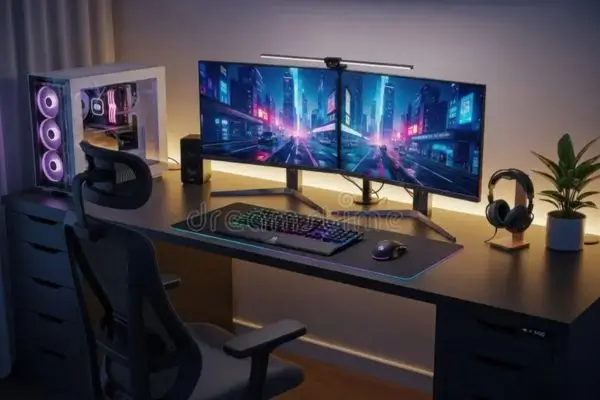
The ideal desk width ranges from 48 to 72 inches, with 60 inches being the sweet spot for most gamers. Depth should be at least 24 inches, though 30 inches provides better monitor distance and equipment placement. Standard desk height sits at 29-30 inches, but adjustable options allow customization for your specific body dimensions.
Gaming Desk IKEA: Budget-Friendly Scandinavian Solutions
IKEA has become surprisingly popular in the gaming community, offering affordable options that punch above their price point. The Swedish furniture giant provides modular solutions that let you create custom gaming setups without breaking the bank.
Top IKEA Gaming Desk Options
The IKEA Bekant series represents their flagship office desk line that gamers have enthusiastically adopted. Available in multiple sizes from 47 to 63 inches wide, the Bekant features a clean, minimalist design with optional sit-stand functionality. The electric height-adjustable version allows you to switch between sitting and standing positions, promoting better circulation during extended gaming sessions. Prices range from $200 for the standard version to $500 for the mmotorizedadjustable model.
The IKEA Linnmon/Adils combination offers the most budget-conscious solution. This mix-and-match system lets you choose a tabletop and pair it with adjustable legs. The Linnmon tabletop comes in various sizes up to 78 inches, providing ample space for multi-monitor setups. At approximately $60-100 for a complete setup, this option attracts students and gamers building their first dedicated gaming space. However, the particleboard construction means weight capacity is limited compared to solid wood or steel frame alternatives.
For gamers seeking corner solutions, the IKEA Bekant corner desk maximizes space efficiency in smaller rooms. The L-shaped configuration provides separate zones for gaming and productivity, making it ideal for streamers who need space for broadcasting equipment alongside their gaming rig.
IKEA Gaming Desk Advantages
IKEA excels in affordability without sacrificing basic functionality. Their modular approach means you can upgrade components over time as your budget allows. The widespread availability of IKEA stores and their flat-pack shipping make these desks accessible globally. Additionally, the minimalist Scandinavian aesthetic fits well with modern gaming room designs, and the neutral colour options blend seamlessly with RGB lighting setups.
Potential Drawbacks
The particleboard construction of many IKEA desks limits their weight capacity, typically maxing out around 110 pounds. Heavy multi-monitor arms or thick glass cases might strain cheaper models. Cable management isn’t built-in on most options, requiring aftermarket solutions. Assembly can be time-consuming, and the quality, while adequate, doesn’t match dedicated gaming desk manufacturers.
Gaming Desk Amazon: Endless Options at Your Doorstep
Amazon has emerged as the go-to marketplace for gaming desks, hosting hundreds of options from budget models to premium gaming stations. The platform’s extensive selection, customer reviews, and fast shipping make it an attractive option for gamers shopping online.
Top-Rated Amazon Gaming Desks
The Bestier L-Shaped Gaming Desk consistently ranks among Amazon’s bestsellers. This 95-inch corner desk features built-in LED lighting strips, a power outlet strip with USB charging ports, and a dedicated monitor stand shelf. The carbon fibre textured surface resists scratches while providing a modern aesthetic. Customer reviews praise its spaciousness and value at around $180-220, though some note that assembly requires patience.
For gamers prioritising stability, the FlexiSpot Electric Height Adjustable Desk offers motorised sit-stand functionality with a more robust build than IKEA alternatives. The solid desktop supports up to 275 pounds, accommodating even the heaviest gaming rigs. Three programmable height presets let you save preferred positions for sitting, standing, and collaborating. At $400-500, it represents a mid-range investment in your long-term gaming health.
The Coleshome Computer Desk provides an affordable 47-inch option for smaller spaces or single-monitor setups. Despite its budget-friendly $80-100 price point, it includes a monitor stand, shelf and side storage pocket. The industrial design with metal frame construction offers better stability than comparably priced particleboard alternatives.
Shopping Smart on Amazon
Amazon’s vast selection requires strategic navigation. Always check customer reviews, focusing on comments about stability, assembly difficulty, and long-term durability. Look for desks with at least 500 reviews and a 4.3-star rating or higher. Pay attention to “Amazon’s Choice” and “Best Seller” badges, which indicate popular, well-rated products. Compare dimensions carefully against your available space; many buyers overlook this step and end up with desks that don’t fit their room layout.
Prime membership benefits significantly impact the gaming desk shopping experience. Free two-day shipping on eligible desks saves $50-100 in shipping costs, and hassle-free returns provide peace of mind if the desk doesn’t meet expectations. Amazon’s easy return policy is particularly valuable for furniture purchases, where seeing the item in person makes a difference.
Amazon-Specific Considerations
While Amazon offers convenience and selection, be aware that many brands are Chinese manufacturers with similar products under different names. Read reviews carefully to identify quality differences. Shipping for large desks may not qualify for standard Prime delivery, arriving via freight instead. Assembly instructions from lesser-known brands sometimes lack clarity, so check reviews mentioning assembly experience.
L-Shaped Gaming Desk: MMaximizingYour Gaming Real Estate
L-shaped gaming desks have revolutionised how gamers utilise their space, providing distinct zones for different activities while maintaining an ergonomic workflow. These corner configurations excel in maximizing square footage, particularly in smaller bedrooms or apartments where every inch counts.
Why Choose an L-Shaped Configuration
The dual-surface design creates natural separation between your gaming zone and secondary activities. Many gamers use one side for their primary gaming setup with monitors, keyboard, and mouse, while dedicating the perpendicular section to streaming equipment, reference monitors, or console gaming. This separation improves cable management and prevents clutter from overwhelming your main gaming area.
L-shaped desks fit perfectly into corners, utilizing space that typically goes wasted. This positioning often places you in an optimal viewing angle for the entire room, beneficial for streamers who need to monitor chat on secondary screens or content creators who reference multiple sources while working.
The increased surface area accommodates extensive setups without feeling cramped. Triple-monitor configurations, full-sized gaming keyboards, large mouse pads, and additional peripherals all find their home without competing for space. The extended reach means you can keep frequently used items within arm’s reach while storing less critical equipment further away.
L-Shaped Desk Configurations
Reversible L-shaped desks offer flexibility in corner orientation, allowing left or right configuration based on your room layout and dominant hand. This adaptability proves valuable if you move or rearrange your gaming space. Fixed L-shaped desks come pre-configured for specific corner orientations, sometimes offering better structural integrity but limiting placement options.
Three-piece modular L-shaped systems use separate desk sections that connect at the corner, providing maximum flexibility in arrangement and the ability to separate components if you change spaces. Two-piece attached L-shaped desks feature a main desk with an attached return section, offering more straightforward assembly but less adaptability.
Selecting the Right L-Shaped Desk
Measure your corner space carefully, accounting for door swing, walkway clearance, and window access. L-shaped desks look smaller in product photos than they appear in your room. Consider the corner depth; deeper corners accommodate more equipment but require longer reaches to access items. Ensure the primary gaming side matches your monitor setup width requirements, typically 50-65 inches for dual or triple monitor configurations.
Weight distribution matters with L-shaped desks. Position your heavy gaming PC and monitors on the side with the most structural support, usually the longer section. Check weight capacity specifications for each section independently, as some manufacturers rate the entire desk, but individual sections support less weight.
Gaming Desk with Drawers: Organization Meets Functionality
Storage-integrated gaming desks address one of the biggest challenges gamers face, keeping controllers, cables, game cases, and peripherals oorganizedwithout cluttering the playing surface. Drawers transform your gaming desk from a simple surface into a complete organizational system.
Benefits of Built-In Storage
Dedicated storage keeps your gaming surface clear of clutter, providing more room for gameplay and reducing visual distractions during intense sessions. Drawers protect expensive peripherals from dust, pet hair, and accidental spills that plague open shelving. Secure drawer storage prevents cables, controller dongles, and small accessories from disappearing into the chaos of a busy gaming room.
The convenience factor cannot be overstated. Having backup controllers, charging cables, game cartridges, and cleaning supplies within arm’s reach eliminates mid-gaming interruptions. For streamers, drawers provide discrete storage for camera equipment, lighting controls, and audio gear that doesn’t need constant access but should stay nearby.
Types of Gaming Desk Storage
Shallow accessory drawers typically measure 2-4 inches deep, perfect for storing cables, controller dongles, USB drives, game manuals, and cleaning supplies. These drawers keep small items oorganizedwithout wasting space on excessive depth. Medium drawers at 6-8 inches deep accommodate controllers, headsets, portable hard drives, and gaming mice. This size represents the sweet spot for gaming peripheral storage.
Deep filing drawers reaching 10-12 inches suit physical game collections, large peripherals, or folded gaming merchandise. However, deep drawers occupy significant space beneath your desk, potentially interfering with legroom. Keyboard trays, while not traditional drawers, pull out to create additional surface area and can store keyboards when not in use, though many gamers find them uncomfortable for extended gaming sessions.
Drawer Configuration Considerations
Right-side versus left-side drawer placement affects accessibility based on your dominant hand and room layout. Most desks place drawers on the right, assuming right-handed users, but lefties should specifically seek left-side or dual-side options. The number of drawers involves trade-offs; more drawers provide better organization, but reduce legroom and increase desk cost.
Drawer quality separates budget from premium gaming desks. Ball-bearing slides operate smoothly even when fully loaded and last significantly longer than plastic glides. Soft-close mechanisms prevent slamming that can damage contents or disturb household members during late-night gaming sessions. Locking drawers protect valuable equipment in shared living spaces or households with curious children.
Popular Gaming Desks with Storage
The Walker Edison Soreno 3-Piece Corner Desk includes a keyboard tray and side storage tower with multiple shelves, providing extensive organization in an L-shaped configuration. At $200-280, it balances storage capacity with gaming surface area. The Mr IRONSTONE Gaming Desk features a side drawer and monitor riser shelf, combining storage with ergonomic monitor positioning at a budget-friendly $130-160 price point.
For premium storage solutions, the Eureka Ergonomic Gaming Desk includes a profound drawer, side basket, and cup holder, along with RGB lighting and a full-surface mouse pad. This $300-400 investment provides comprehensive storage without sacrificing gaming-specific features.
Gaming Desk for PS5: Console Gaming Considerations
Console gaming on PlayStation 5 introduces unique desk requirements that differ from PC gaming setups. The PS5’s distinctive size, cooling needs, and peripheral ecosystem demand thoughtful desk selection to optimize performance and aesthetics.
PS5-Specific Desk Requirements
The PlayStation 5 console measures 15.4 inches tall, 10.2 inches wide, and 4.1 inches deep, making it substantially larger than previous consoles. Your desk needs adequate space for the console itself, preferably with good ventilation clearance. Sony recommends at least 4 inches of clearance on all sides for proper airflow, preventing thermal throttling during demanding games.
TV or monitor positioning matters more for console gaming than PC gaming. Console gamers typically sit further from screens, so your desk depth should accommodate a comfortable viewing distance. The ideal viewing distance for a 27-inch monitor is 3-4 feet, while larger displays require proportionally more distance. Consider desks with monitor stands that elevate screens to eye level, reducing neck strain during extended gaming sessions.
Controller charging stations need dedicated space on or near your desk. The DualSense controller’s battery life necessitates having backup controllers charged and ready, requiring charging dock access. Some gaming desks include built-in wireless charging pads or USB hub integration that simplifies controller management.
Console Gaming Desk Features
Dedicated console shelves or cubbies provide safe PS5 storage with proper ventilation. Open-sided shelves allow heat dissipation while keeping the console secure and accessible for disc swapping. Avoid enclosed cabinets that restrict airflow and cause overheating issues. Cable management becomes critical with console gaming due to HDMI cables, power cords, controller charging cables, and optional accessories like camera or VR systems. Look for desks with rear cable management panels or grommets positioned for easy access to console ports.
Stability matters significantly for console gaming desks supporting large TVs or multiple monitors. Check weight capacity carefully; a 55-inch TV weighs 30-45 pounds before adding the PS5, controllers, and accessories. Desks rated for at least 150 pounds provide an adequate safety margin.
Recommended Desks for PS5 Gaming
The IKEA Fredde Gaming Desk was designed with console gaming in mind, featuring a raised platform for monitors, dedicated shelving for consoles, and mesh cable management panels. At $400-450, it represents a purpose-built solution for PlayStation enthusiasts. The desk’s unique design accommodates racing wheel mounts and other console-specific peripherals.
The Atlantic Gaming Desk offers budget-conscious PS5 gamers a functional solution at $150-180. It includes dedicated game storage cubbies, a monitor stand, a controller holder, and speaker platforms. While the construction is lightweight, the specialized console features provide excellent value.
For minimalist console setups, the ApexDesk Little Soleil Standing Desk combines simple aesthetics with mmotorizedheight adjustment. This $400-500 option suits PS5 gamers who prefer clean setups without dedicated gaming desk aesthetics, providing flexibility for both gaming and general use.
Gaming Desk Walmart: Accessible Options for Every Budget
Walmart has significantly expanded its gaming furniture selection, offering both in-store and online options that combine affordability with convenience. The retail giant provides an interesting middle ground between IKEA’s minimalism and Amazon’s overwhelming selection.
Walmart’s Gaming Desk Advantages
Walmart’s in-store availability lets you physically inspect desks before purchasing, eliminating uncertainty about build quality, finish, and actual dimensions. This hands-on evaluation prevents the disappointment of online orders that don’t match expectations. Store pickup options save shipping costs on large furniture items while providing immediate availability. If something goes wrong, Walmart’s widespread store network makes returns and exchanges simpler than shipping furniture back to online retailers.
Price-matching policies ensure you receive competitive pricing even when shopping in stores. Walmart matches Amazon prices on identical items, combining online competitive pricing with in-store convenience. The Walmart+ membership provides free shipping and other benefits similar to Amazon Prime, though the furniture selection may be more limited.
Top Walmart Gaming Desk Options
The Mainstays Basic Student Desk represents Walmart’s budget entry point at $50-70. While not explicitly marketed as a gaming desk, its 42-inch width accommodates single-monitor setups for casual gamers. The simple particleboard construction suits temporary spaces or first gaming setups for younger gamers. The GreenForest L-Shaped Corner Desk, frequently stocked at Walmart, provides 58 inches of space across both sections at $120-150. The industrial-style metal frame offers better stability than pure particleboard alternatives, while the reversible configuration adapts to different room layouts.
For mid-range options, Walmart carries the Homall Gaming Desk with a carbon fibre surface, RGB lighting strip, and monitor stand at $150-180. This desk competes directly with similar Amazon offerings while providing Walmart’s return policy benefits. The Seven Warrior Gaming Desk offers a premium option at $280-320, featuring a distinctive racing-inspired design, full-surface mouse pad, headphone hook, and cable management system.
Walmart Shopping Strategies
Check both in-store and online inventory, as Walmart’s gaming desk selection varies significantly between channels. Online offerings match or exceed what’s available in stores, with expanded colour options and size variations. Compare Walmart prices against Amazon before purchasing. While Walmart matches prices, you need to request the match rather than receive it automatically.
Scrutinise floor models if buying in-store. Gaming desks see heavy customer handling, so check for scratches, loose connections, or missing hardware before committing. Ask if recently opened return items are available at a discount, as Walmart often marks down furniture with damaged packaging even when the desk itself remains pristine.
Delivery options matter for large desks. Walmart’s delivery service varies by location, with some areas offering room-of-choice delivery while others provide only doorstep drop-off. Confirm delivery details before completing your purchase, as carrying a 100-pound desk upstairs alone presents significant challenges.
Making Your Final Decision: A Strategic Approach
Selecting the perfect gaming desk requires balancing multiple factors against your specific needs and constraints. Start by measuring your space accurately, accounting for door clearances, window access, and traffic flow. Create a floor plan marking where your desk will sit, ensuring adequate space remains for your gaming chair, cable routing, and room navigation.
Establish your budget realistically, including not just the desk cost but also shipping, assembly tools if needed, and cable management accessories. Gaming desks range from $60 budget options to $600+ premium setups, with the $200-350 range offering the best balance of features and quality for most gamers.
List your must-have features versus nice-to-have options. Must-haves might include specific width requirements for your monitor setup, cable management grommets, or height adjustability. Nice-to-have features like RGB lighting or built-in USB hubs shouldn’t override fundamental desk quality and ergonomics.
Consider your gaming setup’s evolution. Will you add monitors, upgrade to a larger PC case, or expand into streaming? Choose a desk that accommodates growth rather than barely fitting your current equipment. The extra surface area costs relatively minorcompared to replacing an outgrown desk in two years.
Read reviews extensively but critically. Look for patterns in feedback rather than isolated complaints. Frequent mentions of stability issues, complex assembly, or poor customer service warrant serious consideration, while occasional shipping damage or personal preference differences matter less.
Ergonomics: Protecting Your Gaming Health
No discussion of gaming desks is complete without addressing ergonomics. The right desk height positions your elbows at 90-degree angles when your hands rest on your keyboard and mouse. Your eyes should align with the top third of your monitor when sitting upright, preventing neck strain during marathon sessions.
Monitor distance should follow the arm’s length rule, sit back with your arm extended, and your fingertips should nearly touch the screen. This distance reduces eye fatigue while maintaining comfortable viewing. For multiple monitors, arrange them in a gentle curve, keeping the primary monitor directly in front and secondary displays angled inward.
Cable management impacts more than aesthetics. Tangled cables create tripping hazards, attract dust, and complicate equipment changes. Invest in cable sleeves, velcro ties, and adhesive cable clips to maintain organized routing. Your desk’s cable management features only work if you use them properly.
Lighting matters more than most gamers realize. Position your desk to avoid screen glare from windows or overhead lights. Bias lighting behind your monitor reduces eye strain during evening gaming sessions. If your desk includes RGB lighting, adjust brightness to accent rather than dominate your space; excessive lighting creates distraction and eye fatigue.
Conclusion: Your Gaming Command Centre Awaits
Your gaming desk represents more than furniture; it’s the foundation of your digital world, the command centre where victories happenand friendships form. Whether you choose the budget-friendly modularity of IKEA, the extensive selection of Amazon, the space efficiency of an L-shaped configuration, the organisation of built-in drawers, the console-optimised features for PS5 gaming, or the accessible convenience of Walmart, the perfect desk exists for your specific needs.
Take time with your decision, measuring carefully, reading reviews thoroughly, and considering your gaming habits honestly. A quality gaming desk improves your performance, protects your health, and grows with your gaming journey. The investment you make today pays dividends in comfort, organization, and gaming satisfaction for years to come.
Your perfect gaming setup starts with the properfoundation. Choose wisely, and game on.