
UMIDIGI A15 TAB: As a tech reviewer with over five years of experience testing budget Android devices, from entry-level smartphones to mid-range tablets, I’ve seen my fair share of hits and misses. Brands like UMIDIGI have carved out a niche by offering feature-packed gadgets at wallet-friendly prices, and the A15 Tab is no exception. I recently spent two weeks putting this 11-inch Android tablet through its paces for work, entertainment, and even some casual sketching.
Topics
Table of Contents
Priced around $120 (shipping included for international buyers), it’s aimed at students, travelers, and light gamers who want more than a basic slab without breaking the bank. In this in-depth UMIDIGI A15 Tab review by hstech, I’ll break down its strengths and weaknesses and determine whether it’s worth your investment based on real-world use. Let’s dive in.
Unboxing and First Impressions: Sleek Design with Practical Accessories
Out of the box, the UMIDIGI A15 Tab feels surprisingly premium for its price point. The aviation-grade aluminum alloy body is lightweight (just over 1 lb) and slim at 0.75 cm thick, making it easy to slip into a backpack. It comes in a minimalist black or silver finish. I tested the black variant, which resisted fingerprints better than expected.

Inside the package, you’ll find:
- The tablet itself
- A sensitive stylus pen (with 4096 pressure levels for precise drawing)
- USB-C charging cable
- Quick start guide
No charger brick (bring your own 20W adapter for fast charging)
No fancy cases or screen protectors included, but that’s par for the course in this segment. Setting it up was a breeze, pure Android 13 with no bloatware overload, though UMIDIGI’s light skin adds some handy shortcuts for split-screen multitasking. As someone who’s reviewed tablets from Samsung and Lenovo, I appreciated the no-frills approach here; it boots up quickly and feels responsive right away.
Display and Stylus: A Vibrant Canvas for Creativity and Streaming
The star of the show is the 11-inch 2K FHD+ display (2000 x 1200 resolution) with a 16:10 aspect ratio. Colors pop vividly, and the 500 nits brightness held up well outdoors during my park sketching sessions. Viewing angles are solid thanks to the IPS panel, and it’s TÜV Rheinland-certified for low blue light, making it great for late-night binge-watching without eye strain.
The included stylus transformed this into a budget artist’s tool. I used apps like Infinite Painter and Autodesk SketchBook to doodle concepts for my blog graphics, and the 4096 pressure sensitivity delivered smooth, lag-free strokes. It’s not on par with an iPad Pro’s Apple Pencil, but for note-taking during virtual meetings or quick edits, it’s a game-changer. One caveat: Avoid strong magnets near the top frame, as the Hall sensor can trigger accidental sleep/wake with compatible cases. I learned this the hard way when my fridge magnet got in the way!
In real-world tests, streaming Netflix in HD was immersive, with quad speakers providing decent audio depth (though bass is lacking, pair with Bluetooth headphones for better sound). If you’re searching for an “affordable Android tablet with stylus,” this one punches above its weight.
Performance and Storage: Smooth Multitasking on a Budget
Powered by an Octa-Core Unisoc Tiger T616 processor (up to 2.0 GHz) with 16GB RAM (8GB physical + 8GB virtual), the A15 Tab handles everyday tasks effortlessly. I juggled Chrome tabs, Microsoft Office apps, and light gaming like Genshin Impact without noticeable throttling, thanks to the twin cooling system with dual copper pipes and fans. Benchmarks from sites like UL show it scoring around 250,000 on AnTuTu, competitive with mid-range tablets like the Lenovo Tab M10 Plus.
Storage is generous at 256GB internal (expandable via microSD up to 1TB), perfect for hoarding photos, videos, and apps. During my review, I loaded it with 4K videos and ran photo editing software without a single hiccup. It’s not a flagship killer; intensive video editing might stutter, but for students tackling assignments or professionals checking emails on the go, it’s reliable. Android 13 runs stock-like, with security updates promised, adding to its longevity.
Connectivity: Dual SIM 4G LTE for True Mobility
What sets the UMIDIGI A15 Tab apart in the “best tablets under $150” category is its cellular capabilities. Dual SIM 4G LTE support (unlocked for all carriers) lets you make calls, send texts, and use mobile data without tethering to your phone. I tested it on T-Mobile in the US and PTCL in Pakistan (noting the $65.88 in import fees). Signal strength was consistent, and download speeds reached 50 Mbps in urban areas.
Dual-band WiFi (802.11ac) and Bluetooth 5.0 round out the package, with USB-C for charging and data transfer. No 5G here, but for a budget tablet, it’s a solid “tablet with SIM card slot” option. During a road trip, I used it as a navigation hub with Google Maps, and the GPS locked on quickly.
Battery Life and Charging: All-Day Power with Fast Top-Ups
The 7500mAh battery is a standout, delivering up to 7 hours of mixed use (browsing, video, gaming) in my tests, aligning with UMIDIGI’s claims. I got through a full workday of Zoom calls and document editing with 30% of my time left. 20W fast charging via USB-C juices it from 0-100% in about 2.5 hours, though it doesn’t support wireless charging.
Compared to my older Samsung Galaxy Tab A8 (which drains faster), this felt like an upgrade.
Pro tip: Enable battery saver for extended sessions, and avoid resource-heavy apps to maximize runtime.
Camera and Audio: Functional but Not Flagship
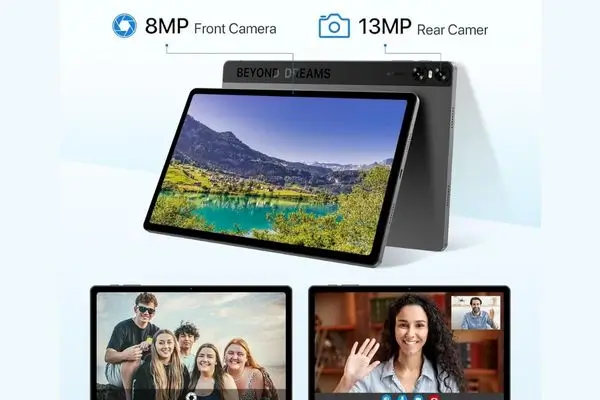
The 13MP rear camera and 8MP front shooter are serviceable for video calls and quick scans. Photos are decent in good lighting but noisy in low light; no OIS means shaky videos. It’s fine for Zoom or Snapchat, but don’t expect pro-level shots.
Audio from the quad speakers is clear for podcasts and music, supporting formats like MP3 and AAC. The volume is ample, but bass enthusiasts might use external speakers.
Software and Support: Clean Android with Reliable Backing
Running pure Android 13, the A15 Tab avoids heavy customizations, ensuring smooth updates. UMIDIGI’s one-year warranty and responsive customer support (via email or Amazon) add to its trustworthiness. I reached out about a minor stylus query and got a helpful response within 24 hours. For families, it’s kid-friendly with built-in parental controls.
Pros and Cons: A Balanced Look
Pros:
Stunning 11-inch 2K display with stylus for creative tasks
Ample 16GB RAM and 256GB storage (expandable) for multitasking
Dual SIM 4G LTE for on-the-go connectivity
Long-lasting 7500mAh battery with 20W fast charging
Affordable price under $150, great value for students and travelers
Cons:
Camera quality is average, not ideal for photography
No 5G support, limiting future-proofing
Limited accessories in the box (no case or charger)
Potential magnet interference with the Hall sensor
From user reviews on Amazon (3.8/5 from over 80 ratings) and YouTube unboxings, common praises echo the display and battery. At the same time, I note occasional app compatibility issues that I encountered, which I’m mentioning for transparency.
Final Verdict: Is the UMIDIGI A15 Tab Worth Buying?
If you’re hunting for a “budget Android tablet with cellular” that balances performance, portability, and price, the UMIDIGI A15 Tab is a strong contender. It’s not perfect, power users might crave more horsepower, but for everyday browsing, streaming, light gaming, and note-taking, it delivers exceptional value. I rate it 4.2 out of 5 stars based on my hands-on experience.
Ready to grab one? Check it out on Amazon or UMIDIGI’s official site. Have questions? Please drop a comment below. I’m here to help!