
WhatsApp has relied on its gold-standard end-to-end encryption to keep our messages private. But as hackers move away from “cracking codes” and toward “stealing identities,” encryption alone isn’t enough.
Enter Strict Account Settings.
This newly announced high-security mode represents the most aggressive shift in WhatsApp’s history toward proactive defense. It isn’t just a minor update; it’s a total reimagining of what “account ownership” means in a world of sophisticated phishing and SIM-swapping.
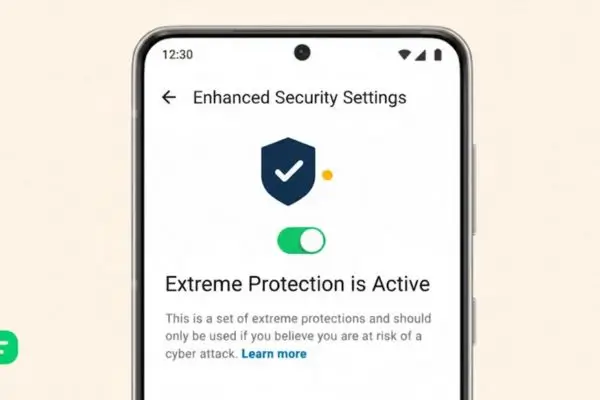
Table of Contents
Why “Strict” is the New Standard
If you’ve ever had a friend’s account compromised, only to receive a suspicious link or a request for money five minutes later, you know that the current security landscape is a bit of a cat-and-mouse game. Most users treat security as an afterthought until something goes wrong.
The “Strict Account Settings” mode is designed to flip that script. Instead of waiting for a suspicious login to happen, this mode tightens the digital bolts of your account, making it significantly harder for anyone (including you, if you’re forgetful!) to make high-level changes without multi-layered verification.
What Actually Happens When You Toggle It On?
When you enable Strict Account Settings, you aren’t just adding a password; you are essentially placing your account into a “High-Security Vault.” Here are the core pillars of the feature:
- Hardware-Bound Verification: The mode prioritizes physical security keys or specific trusted devices over SMS codes, which are notoriously vulnerable to interception.
- Mandatory Cooldown Periods: Attempting to change your primary phone number or linked email address now triggers a 24-hour “holding pattern,” alerting you on all devices before the change takes effect.
- Aggressive Metadata Masking: It limits the visibility of your online status and “Last Seen” to an even more granular level, preventing bad actors from mapping your activity patterns.
- Deep-Link Protection: The app automatically scans incoming links against a more rigorous database of known malicious domains, providing a “Strict” warning before you can even click.
The Death of the SMS Code
For over a decade, the SMS verification code was the king of security. We’ve all used them. But in 2026, relying on an SMS is like locking your front door with a piece of string. Between SIM swapping (where a hacker convinces your carrier to port your number to their SIM) and “over-the-shoulder” phishing, the SMS code is the weak link.
Under the new Strict Mode, WhatsApp pushes users toward Passkeys and Biometric Locking. By linking your account to the physical hardware of your phone or a FIDO2 security key, a hacker in another country can’t access your account, even if they have your phone number. They would need your physical thumb or your face to authorize a login.
The Psychology of Security: Friction vs. Freedom
One might ask: “Why isn’t this just the default for everyone?”
The answer lies in the balance between security and convenience. Most people want their technology to “just work.” If you lose your phone and have Strict Account Settings enabled, getting back into your account will be significantly harder. You can’t just pop your SIM into a new device and hit “Go.”
This “frictional security” is intentional. By making it harder to change account details, WhatsApp is betting that users would rather endure a 24-hour wait during a legitimate phone upgrade than face a 5-minute window of vulnerability in which a hacker could steal their digital identity. It’s a trade-off: you give up a little bit of speed for a massive amount of peace of mind.
Technology Solutions Professional: Guide + 5 Key Responsibilities
How to Prepare for the Switch
If you plan to enable this mode once the rollout reaches your region, you shouldn’t just blindly “flip the switch.” High-security modes require high-security responsibility.
1. Update Your Recovery Methods
Before going “Strict,” ensure your recovery email is an account you actually have access to and that it is also secured with two-factor authentication. In Strict Mode, if you lose your primary device and your recovery email is compromised, you may permanently lose your WhatsApp history.
2. Set Up a Passkey
If your phone supports it, set up a Passkey. This uses your phone’s built-in security chip to create a unique digital signature. It’s significantly more secure than a typed password and much faster to use.
3. Educate Your Circle
Security is a team sport. If you enable Strict Mode, tell your frequent contacts. Let them know that if they ever see a “Security Code Changed” notification for you, it’s a big deal. The more your inner circle knows about your security posture, the less likely they are to fall for a “spoofed” version of you.
The Bigger Picture: The War on Social Engineering
We often think of “hacking” as someone in a hoodie typing lines of green code into a terminal. In reality, most hacking is Social Engineering. It’s someone calling you pretending to be support, or a “friend” asking for a code they “accidentally” sent to your phone.
Strict Account Settings is a direct counter to social engineering. By removing the “human element” from the verification process, requiring biometrics or hardware keys instead of spoken codes, WhatsApp is effectively taking the weapon out of the scammer’s hand. Even if a scammer tricks you into clicking a link, the “Strict” protocols prevent them from taking over the account because they lack the physical “handshake” required by the new mode.
Is it Right for You?
Not everyone needs this level of lockdown. If you use WhatsApp purely for casual memes and organizing Sunday brunch, the standard settings are likely sufficient. However, for certain groups, this mode is a game-changer:
- Business Owners: If you use WhatsApp to communicate with clients or handle orders, an account takeover is a financial disaster.
- Journalists and Activists: For those handling sensitive information, metadata masking and hardware-bound keys are non-negotiable.
- High-Profile Individuals: Anyone whose identity carries a “bounty” for scammers should use the strictest available settings.
Conclusion: A New Era of Privacy
WhatsApp’s introduction of “Strict Account Settings” marks a point of no return for mobile messaging. It signals that the industry is finally admitting that passwords and SMS codes are relics of a simpler time. As we move deeper into a decade defined by AI-driven scams and sophisticated digital theft, having a “High-Security Mode” isn’t just a luxury. It’s a necessity.
By choosing to be “Strict,” you are taking ownership of your digital footprint. You are saying that your conversations, your memories, and your identity are worth the extra thirty seconds of verification. In a world that wants everything to be fast, sometimes it’s better to be safe.
What do you think? Are you ready to trade a bit of convenience for an unhackable account, or does “Strict Mode” feel a bit too restrictive for your daily use?
Technology Solutions Professional: Guide + 5 Key Responsibilities